

Calling Party Category (CPC)#
Calling Party Category (CPC) identifies the type of network or device from which a call originates, such as a landline, mobile network, or public payphone. DIDWW can deliver CPC information on inbound SIP calls in the Request-URI or as a parameter in the SIP From header.
Receiving systems can use CPC to route calls or apply different call handling based on whether the call originated from a landline, mobile network, public payphone, or an unknown source.
CPC delivery is disabled by default. To enable it, configure the inbound SIP trunk for CPC delivery in the Request-URI or request activation for CPC delivery in the From header. The selected method determines which values are delivered and where the receiving system reads them.
Delivery methods#
Method |
Value format |
Availability |
|---|---|---|
Numeric values from |
Available for Toll-Free numbers only. Add the |
|
Text values such as |
Requires activation by DIDWW Support at support@didww.com. |
CPC in the Request-URI#
For Toll-Free calls, DIDWW can insert a two-digit CPC value into the user part
of the Request-URI. The position of {CALL_CPC} in User Part of R-URI
determines whether the value appears before or after the DID. The CPC value
always appears before the @ symbol.
Request-URI CPC values#
Value |
Source type |
|---|---|
|
Standard landline |
|
Mobile network |
|
Public payphone |
|
Unclassified or unavailable source |
Request-URI formats#
The following formats place the CPC value after or before the DID:
{DID}{CALL_CPC}@example.com
{CALL_CPC}{DID}@example.com
For example, the following Request-URIs use DID 18003864279 and place the
CPC value after the DID:
Landline source: 1800386427901@example.com
Mobile source:   1800386427902@example.com
Payphone source: 1800386427903@example.com
Unknown source:  1800386427904@example.com
Configure CPC in the Request-URI#
To add the Calling Party Category value to the Request-URI:
Go to Voice > Inbound Trunks in the DIDWW User Panel.
Locate the inbound SIP trunk, click Actions, and select Edit.
On the General tab, include
{CALL_CPC}in User Part of R-URI. Place it before or after{DID}according to the required Request-URI format. The field can also contain custom characters.Click Submit.
If an inbound SIP trunk does not exist, create a SIP trunk first. For the complete field description, see Static Endpoint fields.
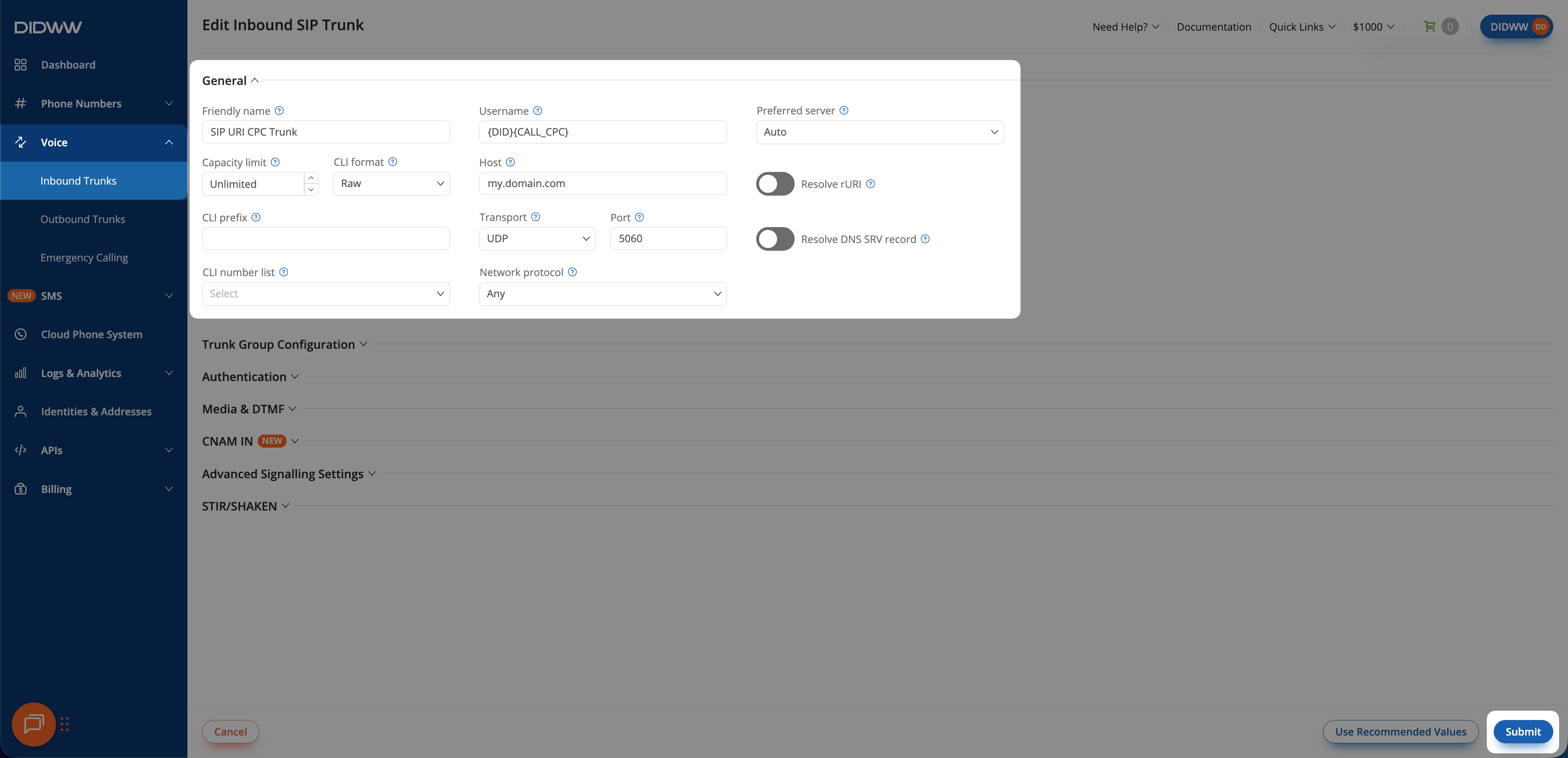
Fig. 1. Configure {CALL_CPC} in User Part of R-URI.#
CPC in the From header#
DIDWW can deliver the CPC value as the cpc parameter in the SIP From
header. This method uses text values.
Note
CPC delivery in the From header is not enabled by default. To enable this feature for your inbound SIP trunks, contact support@didww.com.
From header CPC values#
Value |
Source type |
|---|---|
|
Standard landline |
|
Mobile network |
|
Public payphone |
|
Unclassified or unavailable source |
From header format#
The CPC value appears as a parameter in the SIP URI contained in the From header:
From: <sip:{DID}@example.com;cpc=value>;tag=12345
For example, cpc=ordinary identifies a call from a standard landline:
From: <sip:14039351222@example.com;cpc=ordinary>;tag=12345
Limitations#
Request-URI delivery is available for Toll-Free numbers only.
From-header delivery is disabled by default and requires activation by DIDWW Support at support@didww.com.
DIDWW can deliver only the CPC information available for the incoming call. When the source category is unclassified or unavailable, DIDWW delivers
04in the Request-URI orunknownin the From header.