

How emergency calling service works#
A DID number with the Emergency Calling feature must be registered and verified before it can be used for emergency calls. Submit an emergency verification request for the number with the end user’s Identity, emergency service Address, and any required supporting documents. These details must meet the requirements for the number’s country and type.
Once the verification is approved and the Emergency Calling Service becomes Active, you can use the registered number as caller ID when calling a supported emergency number through an outbound trunk. The trunk must allow that number for emergency calling. The presented caller ID links the call to the verified end user and emergency service address recorded in the service.
How emergency calling works#
Emergency calling works in two stages. First, you create an Emergency Calling Service for your DID numbers, and DIDWW staff verify the identity and address. Then, once the service is Active, you can place emergency calls through an outbound trunk, using a verified DID number as the caller ID.
When an emergency call reaches DIDWW, DIDWW checks that the caller ID belongs to a verified Emergency Calling Service before it routes the call to the emergency services.
        %%{init: {
  "theme": "base",
  "themeVariables": {
    "fontSize": "14px",
    "actorBkg": "#e0f2fe",
    "actorBorder": "#38bdf8",
    "actorTextColor": "#1f2d3d",
    "actorLineColor": "#38bdf8",
    "signalColor": "#0f766e",
    "signalTextColor": "#1f2d3d",
    "labelBoxBkgColor": "#ccfbf1",
    "labelBoxBorderColor": "#14b8a6",
    "labelTextColor": "#1f2d3d",
    "noteBkgColor": "#fef3c7",
    "noteBorderColor": "#f59e0b",
    "noteTextColor": "#1f2d3d",
    "sequenceNumberColor": "#ffffff"
  }
}}%%

sequenceDiagram
   autonumber
   participant you as You
   participant didww as DIDWW
   participant emergency as Emergency services

   you->>didww: Create an Emergency Calling Service<br/>with DID numbers, identity, and address
   Note over didww: Staff verify the identity and address
   didww-->>you: Service becomes Active
   you->>didww: Dial 112 or 911 through the outbound trunk<br/>with a verified DID as the caller ID
   Note over didww: Check that the caller ID belongs<br/>to a verified service
   didww->>emergency: Connect the call
Emergency calls are answered by a Public Safety Answering Point (PSAP), the center that dispatches police, fire, or medical help. A VoIP number is not tied to a fixed line, so each source number is registered with a verified emergency service address that records the end user’s registered emergency location. Keep this address current. If the end user moves, request an address change right away, because emergency calls keep using the previous address until the new one is verified.
Each country has its own emergency numbers, and they have no international
format. Dial them exactly as listed for the country, without a country code
and without a + or 0 prefix. See Emergency number dialing
reference.
Emergency Calling Services and DID numbers#
The DID numbers in an Emergency Calling Service are its source numbers. All source numbers of a service belong to the same country and number type, and they share the identity and address of the service. A DID number can belong to only one Emergency Calling Service, so the same identity and address apply to every emergency call from that number.
Only DID numbers with the Emergency Calling feature can be added as source numbers. A DID number that is already linked to an identity, for example through End User Registration, A2P SMS Campaigns, or CNAM, can be used only with that same identity. Numbers that are not linked to any identity can be used with any identity.
When the first Emergency Calling Service is activated, all existing outbound trunks are set to Allow all available DID(s) for emergency calling. You can instead allow only selected DID numbers on a trunk. See Configure emergency calling for outbound trunks.
Outbound trunks can route emergency calls even if Outbound Termination is not enabled on your account. In that case, you can still create an outbound trunk, but it can place only emergency calls from verified source numbers. Calls to local and international destinations stay restricted until Outbound Termination is enabled. See Get Access to Local and International Voice Termination.
Requirements#
The identity and address of a service must comply with local emergency service regulations and match the country and number type of its source numbers. Emergency calling availability and requirements vary by country and number type. When you select a Country and Number type in the Create Emergency Calling Service form, the Requirements panel shows the requirements for that combination.
Requirement |
Details |
|---|---|
Account access |
Emergency calling is generally available only for business customers and is not enabled by default. To enable it on your account, contact sales@didww.com. To create and manage services, your user needs the Admin or Commercial role. Users with the Billing or Technical role can view existing services only. See User roles. |
Source numbers |
At least one active DID number with the Emergency Calling feature. The available number types depend on the country. See Number type values. |
Identity |
An identity that meets the requirements listed for the selected country and number type. Depending on the country and number type, the identity must be personal, business, or either. For example, United States Local DIDs require a first name, last name, and contact phone number, and a company name for business identities. An identity that does not meet the requirements cannot be selected, and a tooltip explains why. See Create New Identity & Address. |
Emergency address |
An address that belongs to the selected identity and is located in the country of the service. For example, a United States address requires the state, city, street, street number, apartment or suite information, and zip code. |
Emergency calling form |
Required for some countries and number types. The Verification details step then shows an Additional Information section, where you download the form template, fill it out, and upload it. |
Agreement |
Required for some countries and number types that have emergency calling restrictions. Clicking Submit then opens the Important VoIP Emergency Service Information window, where you accept the restrictions and click Agree & Complete Order. Otherwise, Submit creates the request directly. |
The identity cannot be changed after the request is created. To use a different identity, cancel the request and create a new one.
Documents uploaded for identities and addresses are encrypted with AES-256-CBC and stored on DIDWW servers. Only authorized parties can decrypt them, using private keys stored in a Hardware Security Module (HSM).
The Country list in the form shows the countries where you can create a service. For country-specific availability, onboarding, and documentation requirements, contact sales@didww.com.
Charges#
In the User Panel, the Create Emergency Calling Service form shows the Service setup fee per number and Monthly fee per number for the selected country and number type. The Summary step shows the total setup, recurring monthly, and applicable VAT amounts for the selected source numbers.
For a new service, the first monthly fee and any applicable one-time setup fee are deducted from your account balance when verification is approved and the service becomes Active. The setup fee does not recur. The monthly fee is the recurring service administration fee, shown on invoices as Service administration fee, and is charged at each monthly renewal.
Submitting a request for review does not charge the account. No initial service charge is made if the request requires changes or is rejected, and resubmitting corrected information does not add a charge.
You can submit a request even if your balance does not yet cover the charges. Your balance must cover the charges before verification can be completed and the service activated.
Removing source numbers does not refund the remaining service time. A canceled service does not renew in the next billing cycle. For descriptions of the pricing fields, see Emergency calling reference.
Verification and request lifecycle#
Every request is reviewed by DIDWW staff before it can become Active. The estimated verification time depends on the country and number type, and it is shown in the Create Emergency Calling Service form and on the service page until the service is Active.
Some steps of the lifecycle are actions you take in the DIDWW User Panel, and others are performed by DIDWW staff.
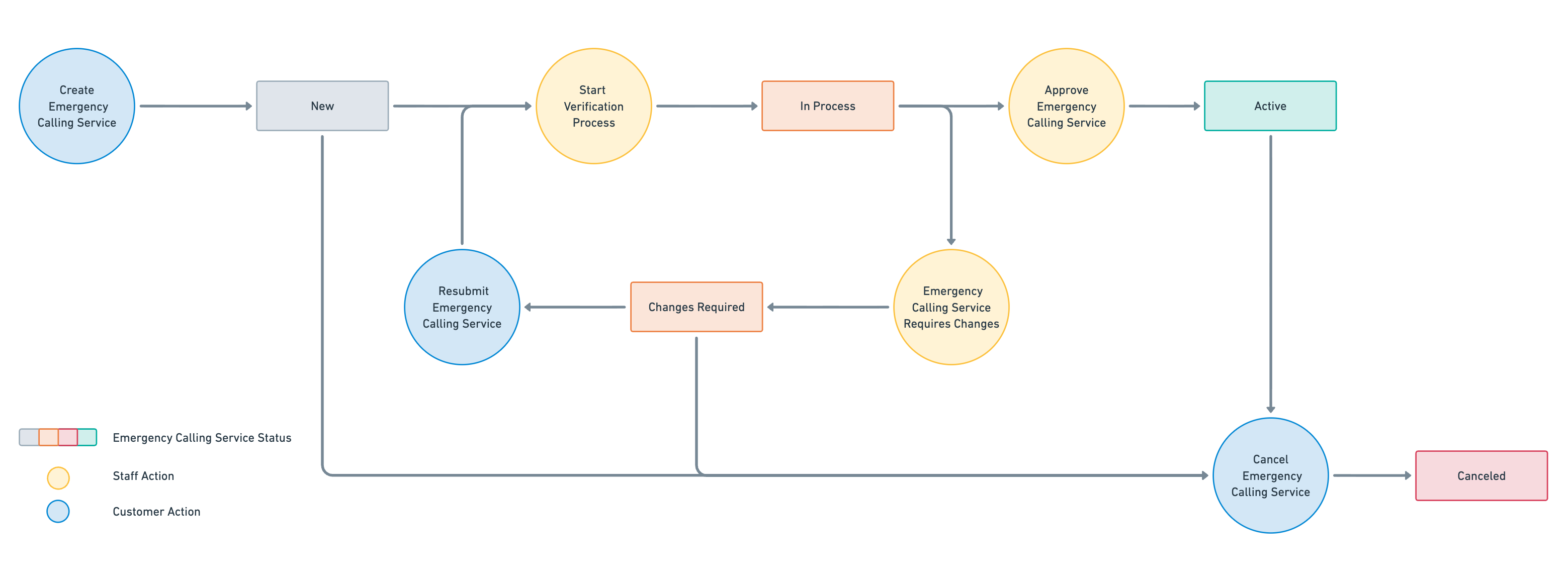
Fig. 1. Emergency Calling Service request flow#
A new request has the New status. It changes to In process when DIDWW staff start the verification, and to Active when the verification is approved. If the submitted information needs corrections, the request moves to Changes required, and the service page shows the reject reasons and any additional comments. After you correct and resubmit the request, the verification starts again and the status returns to In process.
Do not rely on emergency calling from a number until its service is Active. Until then, the number cannot be used as the caller ID for emergency calls.
For the definition of each status and the actions available in it, see Status values and Actions.
Address updates and cancellation#
When a service is Active, you can request a change to its emergency address. The service then enters Pending update status, and the address verification can take up to 5 business days. Emergency calls must always be linked to a verified address, so emergency calling stays available during Pending update under the currently verified address. If the new address is approved, it replaces the previous one and the service returns to Active. If it is rejected, the service returns to Active with the previous address.
A service can be canceled in New, Changes required, Active, or Pending update status, but not while it is In process. Canceling a service immediately deactivates all its source numbers. Removing individual source numbers disables only those numbers. Removing every source number cancels the service automatically within a few hours.