

Send your first SMS with the API#
In this tutorial, you send a single SMS with the Outbound SMS API by using cURL. You collect the credentials of an HTTP OUT trunk, submit a message, and check the result in the API response, the status callback, and the Outbound SMS logs.
Before you begin#
An HTTP OUT trunk. If you do not have one, create an HTTP OUT trunk.
A sender for the message:
For P2P messaging, a DID number that supports Outbound P2P SMS and is allowed in the trunk’s Source Address Settings.
For A2P messaging, an active Sender ID Verification associated with the trunk.
If the trunk has Allowed IP addresses, a computer that sends requests from one of these addresses.
A Callback URL on the trunk, if you want to receive the status callback in step 4.
cURL installed on your computer.
Step 1: Get your trunk credentials#
In the DIDWW User Panel, go to SMS > SMS Trunks.
Locate your HTTP OUT trunk and click the key icon in the Credentials column.
Copy the Username and Password.
Choose an endpoint. Use the global endpoint
https://sms-out.didww.com, or a regional endpoint for lower latency, such as the ones listed in Host(s). For all endpoints, see Endpoints.
For details, see View HTTP OUT trunk credentials.
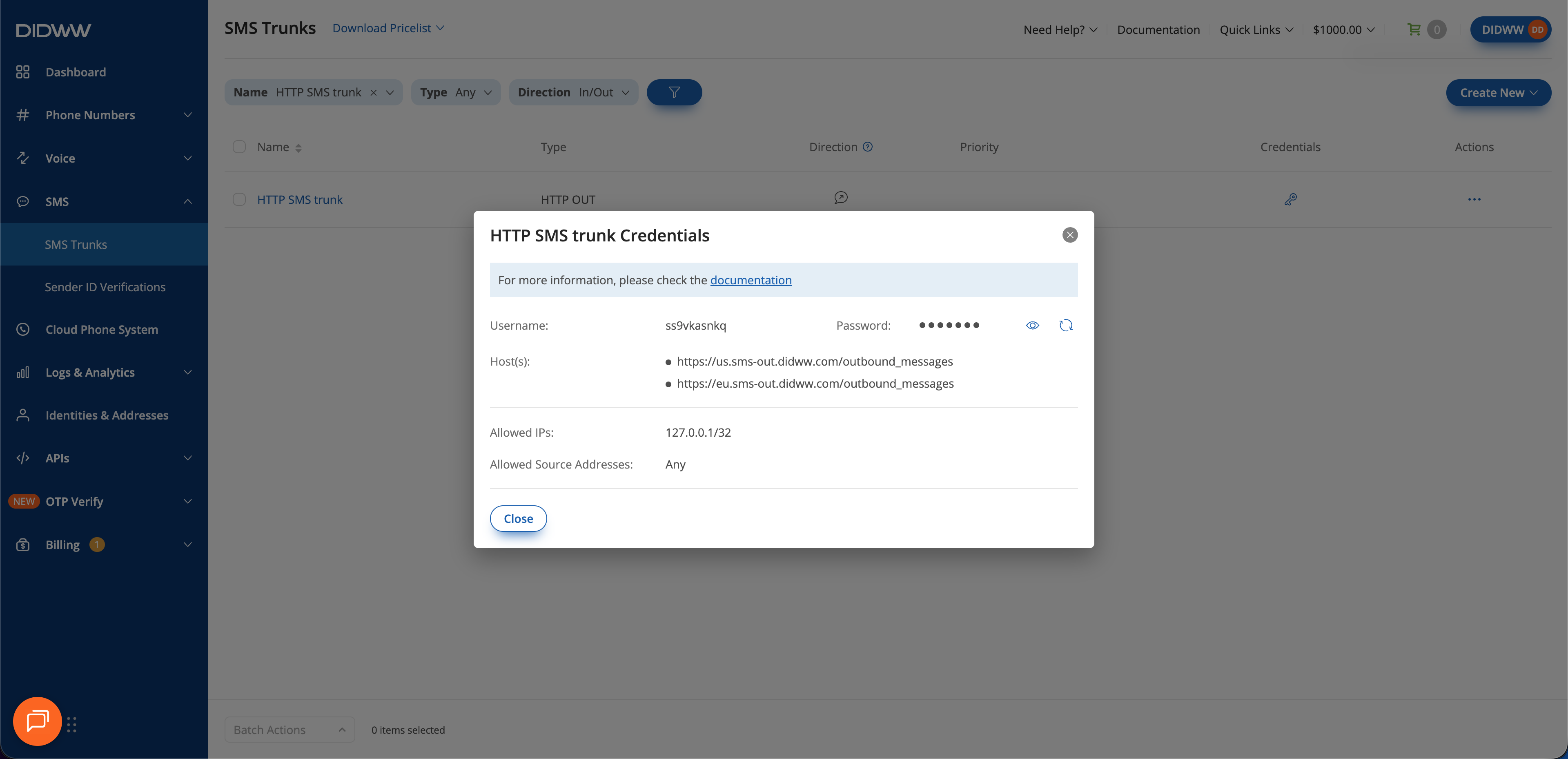
Fig. 1. Get the trunk credentials#
Step 2: Prepare your request#
A single-message request has the following parts:
Method and URL:
POSTto the endpoint from step 1. The path for a single message is/outbound_messages.Headers:
Content-Type: application/vnd.api+jsonand anAuthorizationheader with your credentials. The cURL-uoption creates theAuthorizationheader for you.Body: a JSON:API document with the
outbound_messagestype and the message attributes.
Choose the body that matches your messaging type:
Set source to a DID number that the trunk allows as a sender.
 1{
 2  "data": {
 3    "type": "outbound_messages",
 4    "attributes": {
 5      "destination": "15551234567",
 6      "source": "12125551234",
 7      "content": "Hello World!"
 8    }
 9  }
10}
Set campaign_id to the Campaign ID of your active Sender ID
Verification and omit source. DIDWW randomly selects one of the
Sender IDs registered under that verification. To use a specific
Sender ID, set it in source instead.
 1{
 2  "data": {
 3    "type": "outbound_messages",
 4    "attributes": {
 5      "destination": "15551234567",
 6      "content": "Hello World!",
 7      "campaign_id": "1111aaaa-1a1a-41a1-aaaa-11aaaaa11111"
 8    }
 9  }
10}
Replace the example values with your own:
destination: the recipient’s number in E.164 format, digits only, without the leading+.source: your sender, in E.164 format for DID numbers.campaign_id: the Campaign ID shown on the verification details page.
For all attributes, see Request attributes.
Step 3: Send the SMS#
Run the following command. Replace USERNAME, PASSWORD, and the
endpoint with the values from step 1, and the body with the one you prepared
in step 2.
 1curl -u USERNAME:PASSWORD \
 2  -X POST \
 3  -H "Content-Type: application/vnd.api+json" \
 4  https://sms-out.didww.com/outbound_messages \
 5  -d '{
 6    "data": {
 7      "type": "outbound_messages",
 8      "attributes": {
 9        "destination": "15551234567",
10        "source": "12125551234",
11        "content": "Hello World!"
12      }
13    }
14  }'
Step 4: Inspect the result#
Check the API response. A
201 Createdresponse contains the ID of the message:1{ 2 "data": { 3 "type": "outbound_messages", 4 "id": "550e8400-e29b-41d4-a716-446655440000" 5 } 6}
Save the
id. The response confirms that DIDWW accepted the message for processing. It does not confirm delivery to the recipient.Check the status callback. After processing the message, DIDWW sends an
outbound_message_callbacksrequest to the trunk’s Callback URL with the sameid. Thestatusattribute shows the processing result, andcode_idexplains a failure. See Status callbacks and delivery receipts.In the DIDWW User Panel, go to Logs & Analytics > SMS Logs and choose Outbound to find the message. See Outbound SMS logs.
If the request fails, the API returns an error instead of 201 Created:
400 Bad Request: check that the body follows the JSON:API format shown in step 2 and that every required attribute has a valid value.401 Unauthorized: check the credentials and the trunk’s Allowed IP addresses.415 Unsupported Media Type: check that theContent-Typeheader isapplication/vnd.api+json.429 Too Many Requests: reduce the request rate.
For all errors, see Outbound SMS errors and status codes.
Next steps#
Send bulk SMS with the API — Send the same message to many destination numbers in one request.
Status callbacks and delivery receipts — Process status callbacks and delivery receipts in your application.
Outbound SMS API reference — Review endpoints, attributes, and limits.