

Filters reference#
Filters in My Numbers help you find DID numbers by status, routing, geography, supported features, assigned resources, verification data, lifecycle state, and billing information.
Use filters to narrow the displayed DID numbers before reviewing details, exporting results, or applying batch actions.
Quick filters#
Quick filters appear at the top of the My Numbers page and show counts for DID number groups that may require attention. Filters disappear automatically when no DID numbers match the filter condition.
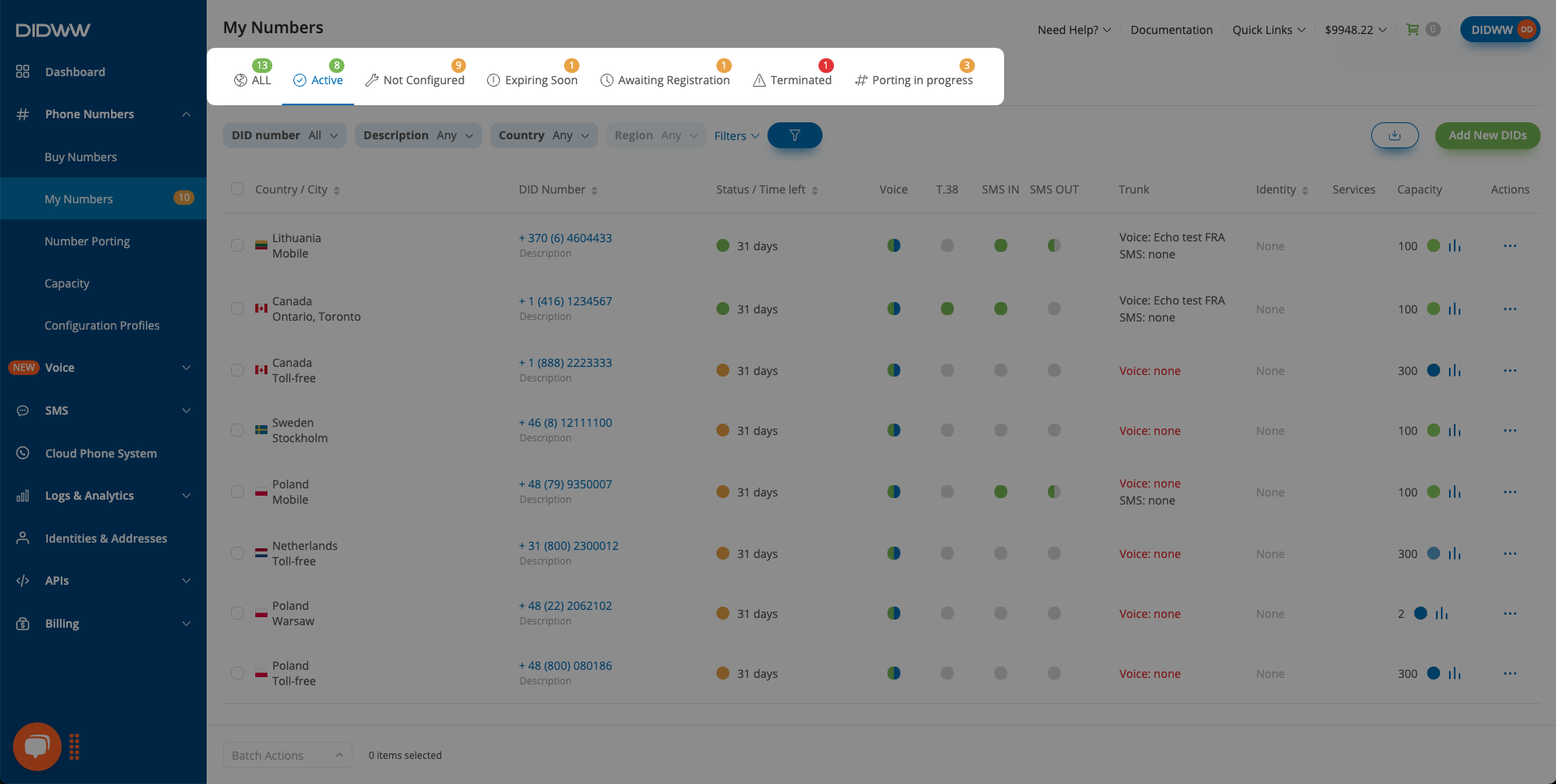
Fig. 1. My Numbers quick filters with status counts.#
Filter |
Description |
|---|---|
All |
Shows all DID numbers in your account. |
Active |
Shows DID numbers that have active service time. |
Not Configured |
Shows DID numbers without required inbound routing or inbound capacity configuration. |
Expiring Soon |
Shows DID numbers that will not renew automatically because no billing cycles remain. |
Awaiting Registration |
Shows DID numbers waiting for end-user verification approval. |
Blocked |
Shows DID numbers that are blocked and cannot receive inbound calls. |
Terminated |
Shows DID numbers that no longer have active service time or were canceled. |
Porting in progress |
Shows DID numbers currently in the porting process. |
All filters#
Filter |
Filter condition |
Description |
|---|---|---|
Contains text input, Single-select filter, Bulk Input |
Filters by DID number. |
|
Description |
Contains text input |
Filters by DID number description. |
Country |
Single-select filter |
Filters by country associated with DID numbers assigned to your account. |
Region |
Single-select filter |
Filters by region or state associated with DID numbers assigned to your account. |
Multi-select checkbox filter |
Filters by DID number type. |
|
Single-select filter |
Filters by supported DID number feature. |
|
Voice trunk |
Single-select filter |
Filters by assigned inbound voice trunk or trunk group. |
SMS trunk |
Single-select filter |
Filters by assigned inbound SMS trunk or SMS trunk group. |
Single-select filter |
Filters by assigned capacity pool. |
|
Capacity group |
Grouped single-select filter |
Filters by assigned capacity group. |
Order ref |
Equals text input. |
Filters by order reference. |
Verification ref |
Equals text input. |
Filters by verification reference. |
Regulatory area |
Single-select filter |
Filters by regulatory area associated with DID numbers assigned to your account. |
Identity |
Single-select filter |
Filters by assigned identity. |
Address |
Single-select filter |
Filters by assigned address. |
Condition selector with numeric input, depending on the selected condition. |
Filters by remaining billing cycles. |
Filter conditions#
Filter condition |
Description |
|---|---|
Contains text input |
Matches values that contain the entered text or digits. |
Equals text input |
Matches only exact entered values. |
Single-select filter |
Allows one value to be selected from a list. |
Grouped single-select filter |
Allows one value to be selected from grouped list sections. |
Multi-select checkbox filter |
Allows multiple values to be selected at the same time. |
Condition selector with numeric input |
Filters numeric values using conditions such as Equals, Less than, or Greater than. |
DID number filter modes#
Method |
Description |
|---|---|
Contains |
Matches DID numbers that contain the entered digits. |
Select |
Selects DID numbers directly from DID numbers assigned to your account. |
Filters up to 250 DID numbers entered in one field as comma-separated values. |
Number type filter values#
Value |
Description |
|---|---|
Local |
Geographic DID numbers associated with a city or local area. |
Mobile |
DID numbers associated with mobile numbering. |
National |
DID numbers associated with national numbering. |
Shared cost |
DID numbers where call costs may be shared according to local numbering rules. |
Toll-free |
DID numbers callers can reach without standard caller-paid charges where supported. |
Global / UIFN |
Global or Universal International Freephone Number DID numbers. |
Features filter values#
Value |
Description |
|---|---|
Any |
Does not restrict results by supported feature. |
Inbound calls |
Shows DID numbers that support inbound call delivery. |
Local CLI |
Shows DID numbers that support local caller ID usage with DIDWW local routes. |
Inbound fax |
Shows DID numbers that support inbound fax. |
Inbound SMS |
Shows DID numbers that support inbound SMS delivery. |
Outbound P2P SMS |
Shows DID numbers that support outbound person-to-person SMS. |
Outbound A2P SMS |
Shows DID numbers that support outbound A2P SMS usage. |
Emergency calling |
Shows DID numbers that support Emergency Calling. |
Outbound CNAM |
Shows DID numbers that support CNAM OUT. |
Capacity pool filter values#
Value |
Description |
|---|---|
Any |
Does not restrict results by capacity pool. |
Standard |
Shows DID numbers assigned to the Standard capacity pool. |
Extended |
Shows DID numbers assigned to the Extended capacity pool. |
Billing cycles left conditions#
Condition |
Description |
|---|---|
Equals |
Matches DID numbers with the exact entered billing cycle value. |
Less than |
Matches DID numbers with fewer billing cycles remaining than the entered value. |
Greater than |
Matches DID numbers with more billing cycles remaining than the entered value. |
Unlimited |
Matches DID numbers configured with unlimited automatic renewal. |