

Inbound call redirection#
Inbound call redirection allows a SIP platform that receives a call from a DIDWW inbound SIP trunk to send that call to an external phone number through a DIDWW outbound SIP trunk. The platform can redirect the call before it is answered or transfer it after a SIP dialog has been established.
To set up the trunks and SIP platform, see Configure call transfers.
DIDWW supports the following methods:
Method |
Timing |
Inbound trunk field |
Destination header |
|---|---|---|---|
SIP 30x Redirect |
Before the inbound call is answered. |
|
|
SIP REFER transfer |
After the inbound call is answered and a SIP dialog is established. |
|
How redirection works#
The SIP platform receives an incoming call through a DIDWW inbound SIP trunk
and selects a new destination. It then returns a SIP 301 or 302 response, or
sends an in-dialog SIP REFER request. DIDWW validates the message against
the corresponding limit on the inbound trunk. Both limits default to 0,
which disables the method.
When the request is accepted, DIDWW creates a new call through a DIDWW outbound SIP trunk. The inbound trunk’s Authorization settings must contain the credentials of that outbound trunk. The destination SIP URI must point to a DIDWW outbound signaling endpoint. For a Static Endpoint inbound trunk, the inbound and outbound trunks must use compatible IP versions.
Warning
Ensure that the destination does not route back to the original DID number. Otherwise, the configuration can create a call loop.
SIP 30x Redirect#
This method redirects an inbound call to a new destination without answering it.
Your system replies to the DIDWW
INVITEwith301 Moved Permanentlyor302 Moved Temporarilyand places the new destination in theContactheader.DIDWW validates the response against Max 30x Redirects.
DIDWW starts a new outbound call to that SIP URI through your outbound trunk, authenticated with the credentials from your inbound trunk.
302 SIP response example
The following example redirects the call to NEW_PSTN_NUMBER through the
DIDWW outbound SIP service:
SIP/2.0 302 Moved Temporarily
Via: SIP/2.0/UDP 192.0.2.5:5060;branch=z9hG4bK-393929
From: <sip:CALLER_NUMBER@46.19.209.14>;tag=123456
To: <sip:DID_NUMBER@example.com>;tag=abcdef
Call-ID: 01-01-35531111-68BE960300095714-69CF836B
CSeq: 1 INVITE
Contact: <sip:NEW_PSTN_NUMBER@out.didww.com>
Content-Length: 0
For the SIP response definition, see RFC 3261 Section 21.3.
SIP redirect call flow
        %%{init: { "theme": "base", "themeVariables": { "actorBkg": "#e6f7ff", "actorBorder": "#1890ff", "noteBkgColor": "#fff7e6", "noteBorderColor": "#fa8c16" }}}%%
sequenceDiagram
  participant caller as Caller
  participant voice_in as DIDWW Inbound Trunk
  participant pbx as Your System
  participant voice_out as DIDWW Outbound Trunk

  caller->>voice_in: INVITE
  voice_in->>pbx: INVITE to your system<br/>sip:DID_NUMBER@example.com
  pbx-->>voice_in: 302 Redirect<br/>Contact: sip:NEW_PSTN_NUMBER@out.didww.com

  Note over voice_in: Checks Max 30x Redirects
  voice_in->>voice_out: INVITE to your Outbound Trunk<br/>sip:NEW_PSTN_NUMBER@out.didww.com
  voice_out-->>voice_in: 401 Unauthorized + Auth Challenge

  Note over voice_in: Applies Auth User and Auth Password from your Inbound Trunk

  voice_in->>voice_out: INVITE with Authorization header<br/>sip:NEW_PSTN_NUMBER@out.didww.com
  voice_out-->>voice_in: 200 OK
  Note over voice_in, voice_out: Call is established through the Outbound Trunk
Use cases
This method fits when the routing decision can be made without answering the call:
Forwarding calls after hours to a service or mobile phone.
Routing VIP callers directly to a dedicated line.
Redirecting desk calls to a mobile phone through follow-me rules.
SIP REFER transfer#
This method transfers an inbound call to a new destination after it has been answered.
Your system answers the inbound call, which creates an active SIP dialog.
When a transfer is needed, your system sends an in-dialog SIP
REFERrequest with the new destination in theRefer-Toheader.DIDWW validates the request against Max Transfers and replies with
200 OKor202 Accepted.Your system sends
BYEto close the original call leg. DIDWW starts a new outbound call through your outbound trunk, authenticated with the credentials from your inbound trunk.
SIP REFER request example
The following example transfers the call to NEW_PSTN_NUMBER through the
DIDWW outbound SIP service:
REFER sip:CALLER_NUMBER@46.19.209.14 SIP/2.0
Via: SIP/2.0/UDP 192.0.2.5:5060;branch=z9hG4bK-443322
Max-Forwards: 70
From: <sip:USERPART@example.com>;tag=abcdef
To: <sip:CALLER_NUMBER@46.19.209.14>;tag=123456
Call-ID: 01-01-35531111-68BE960300095714-69CF836C
CSeq: 2 REFER
Refer-To: <sip:NEW_PSTN_NUMBER@out.didww.com>
Referred-By: <sip:DID_NUMBER@example.com>
Contact: <sip:DID_NUMBER@192.0.2.5:5060>
Content-Length: 0
For the SIP method definition, see RFC 3515.
SIP REFER call flow
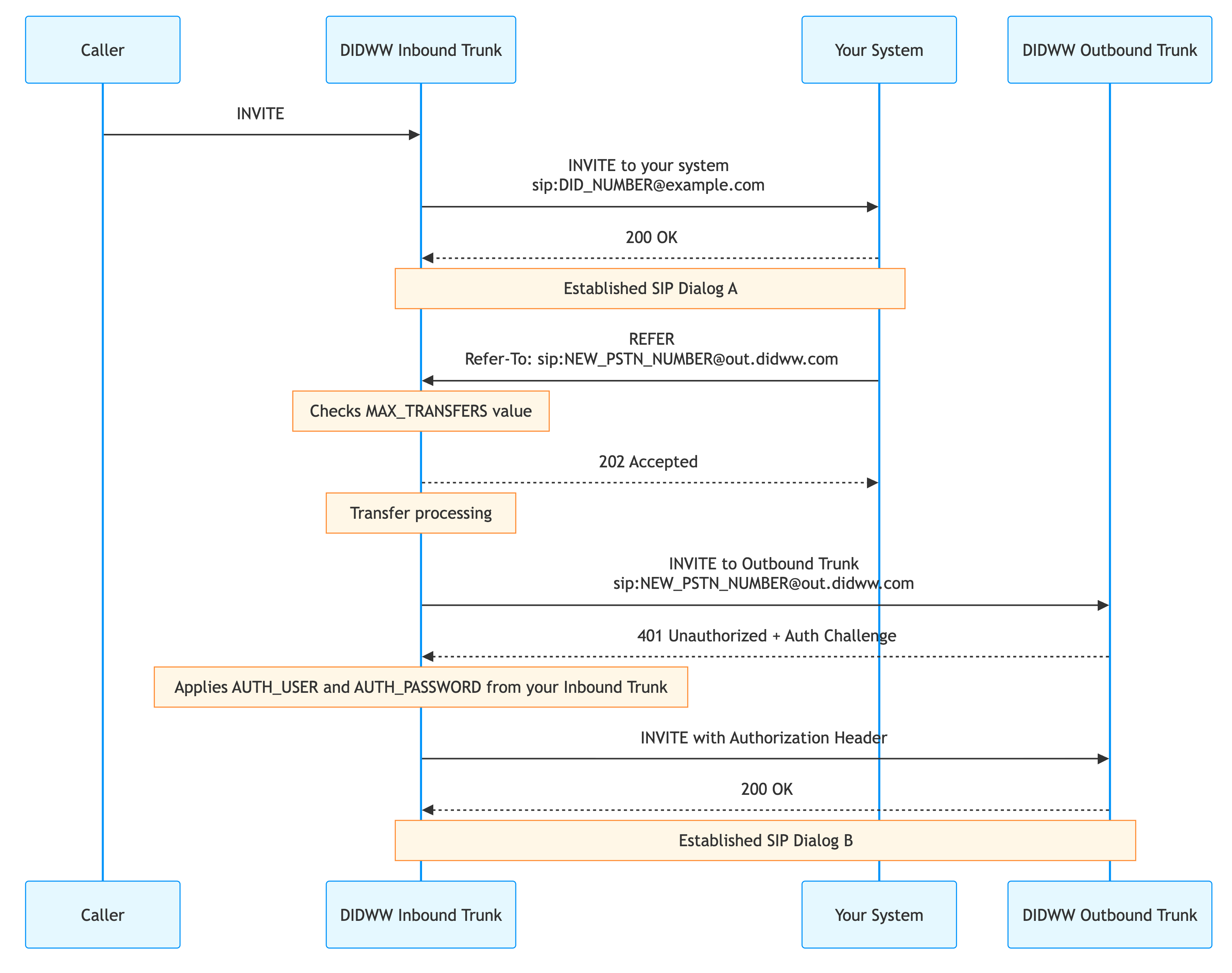
Fig. 1. SIP REFER call flow#
Use cases
This method fits when the call must be answered before the routing decision:
Transferring a caller after an IVR menu selection.
Escalating a call from an AI voicebot to a live agent.
Transferring a call from an agent’s softphone to an external specialist.