

Dashboard#
The Dashboard lists every call that is currently ringing or connected. It updates by itself as calls start, connect, and end, so you can check whether anyone is on a call, whether a number is ringing, or whether a newly published number receives calls.
The Dashboard shows only calls in progress. When a call ends, it disappears from the Dashboard. To review completed calls, use Call History.
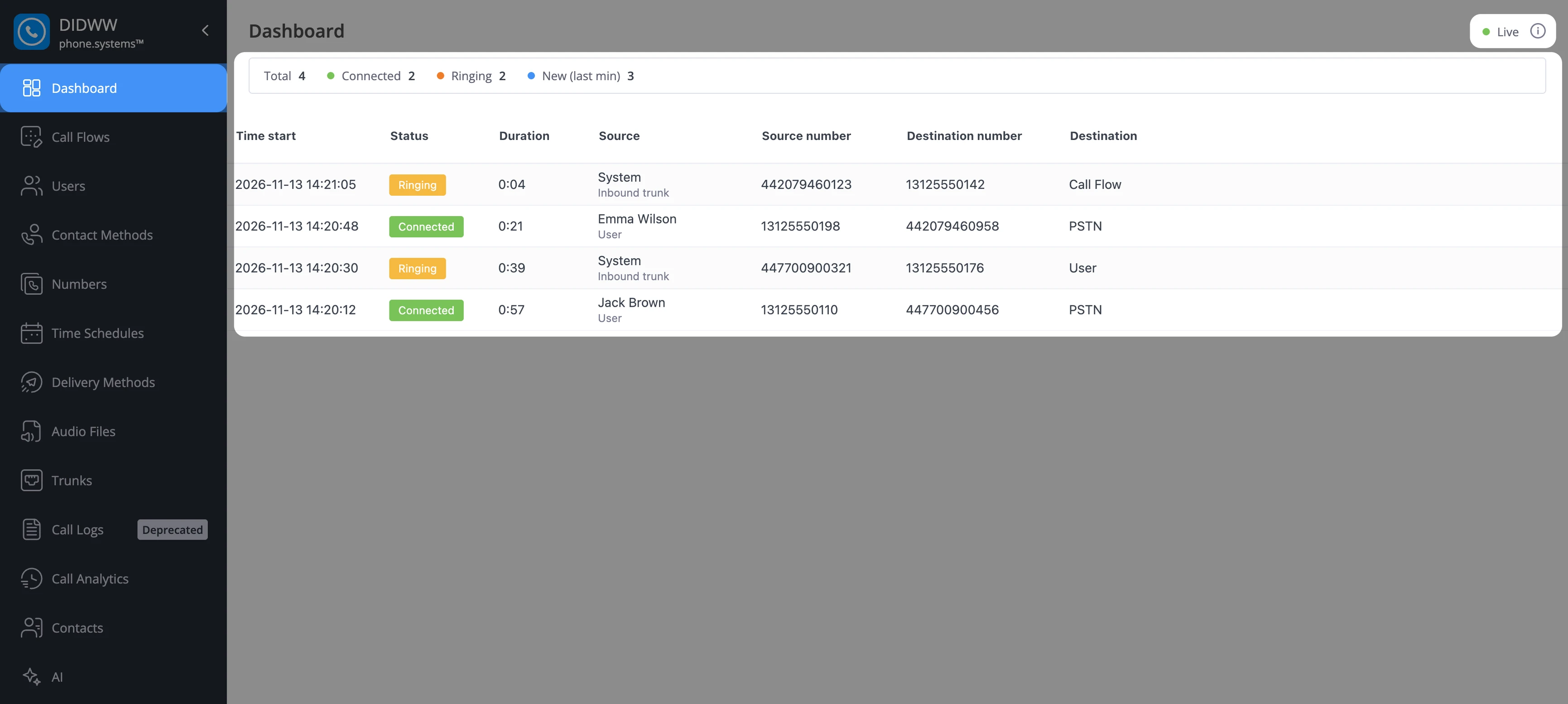
Fig. 1. The Dashboard with calls in progress.#
Summary row#
The summary row above the table counts the calls currently in progress.
Counter |
Description |
|---|---|
Total |
All calls in progress. |
Connected |
Calls in progress that have been answered. |
Ringing |
Calls in progress that have not been answered yet. |
New (last min) |
Calls in progress that started within the last minute. Calls that started and ended within the last minute are not counted. For the first minute after you open the Dashboard, the counter is still collecting data, which is shown when you hover over it. |
Active calls table#
The table shows one row per call in progress, with the newest call first.
Column |
Description |
|---|---|
Time start |
The date and time when the call started. |
Status |
Ringing while the call has not been answered, and Connected after it is answered. The status changes in place, without moving the row. |
Duration |
The running time of the call, updated every second. For a ringing call, it counts from the call start. For a connected call, it counts from the moment the call was answered. |
Source |
The caller name, or the source number if no name is available. The second line shows the source type, User or Inbound trunk, as in Call History. |
Source number |
The number the call comes from. |
Destination number |
The number that was dialed. |
Destination |
The destination type: User, PSTN, Call Flow, or Call Pick-up, as in Call History. |
Some call details may not be available for every call. A missing value is shown as an empty cell or as —, and the rest of the row is still shown.
The Dashboard is read-only. It does not provide actions on calls, such as transferring or ending a call.
Live indicator#
The indicator in the top-right corner shows whether the Dashboard receives live updates.
State |
Description |
|---|---|
Live |
The Dashboard is connected and shows the current calls. |
Connecting |
The Dashboard is connecting or reconnecting to the live call feed. |
Disconnected |
The Dashboard cannot reach the live call feed. It keeps trying to reconnect. |
Hover over the indicator to see how quickly call updates reach the Dashboard:
WS delay: the time between the live call feed sending an update and your browser receiving it.
E2E delay: the time between a call starting and the call reaching the Dashboard.
Both values are shown in milliseconds, averaged over the last 10 seconds. A — symbol means that no recent updates were measured.
Click the information icon next to the indicator to open About the dashboard, a short description of the page.