

SMS over SMPP#
Use OpenSIPS 4.0 with a DIDWW SMPP ESME trunk to send and receive
SMS. Relay SIP MESSAGE requests from a user agent as outbound SMS, and
deliver incoming SMS and delivery receipts to the user agent as SIP
MESSAGE requests.
OpenSIPS binds to the DIDWW SMSC as an SMPP client using the proto_smpp module. All required modules are part of a stock OpenSIPS installation, and no database server is required. For inbound and outbound calling, see Voice over SIP.
Important
OpenSIPS relays messages and does not create them. A user agent that sends
and receives SIP MESSAGE requests is required.
Part 3 uses Asterisk as an example.
1. Configure SMPP ESME trunk#
Configure an SMPP ESME trunk in the DIDWW User Panel so that OpenSIPS can bind to the DIDWW SMSC.
Before you begin#
An active DIDWW account is required. Sign in to DIDWW or create a DIDWW account.
To send SMS, a sender is required. Use a DID number with Outbound P2P SMS enabled for P2P messaging, or a verified sender ID for A2P messaging. See Sender ID Verifications.
To receive SMS, a DID number that supports inbound SMS is required. If you do not have one, see How to buy numbers.
The OpenSIPS server must be able to open a TCP connection to the DIDWW SMSC on port
2775, or on port2776for TLS.
Step 1: Create New SMPP ESME trunk#
In the DIDWW User Panel, go to SMS > SMS Trunks.
Click Create New > SMPP ESME.
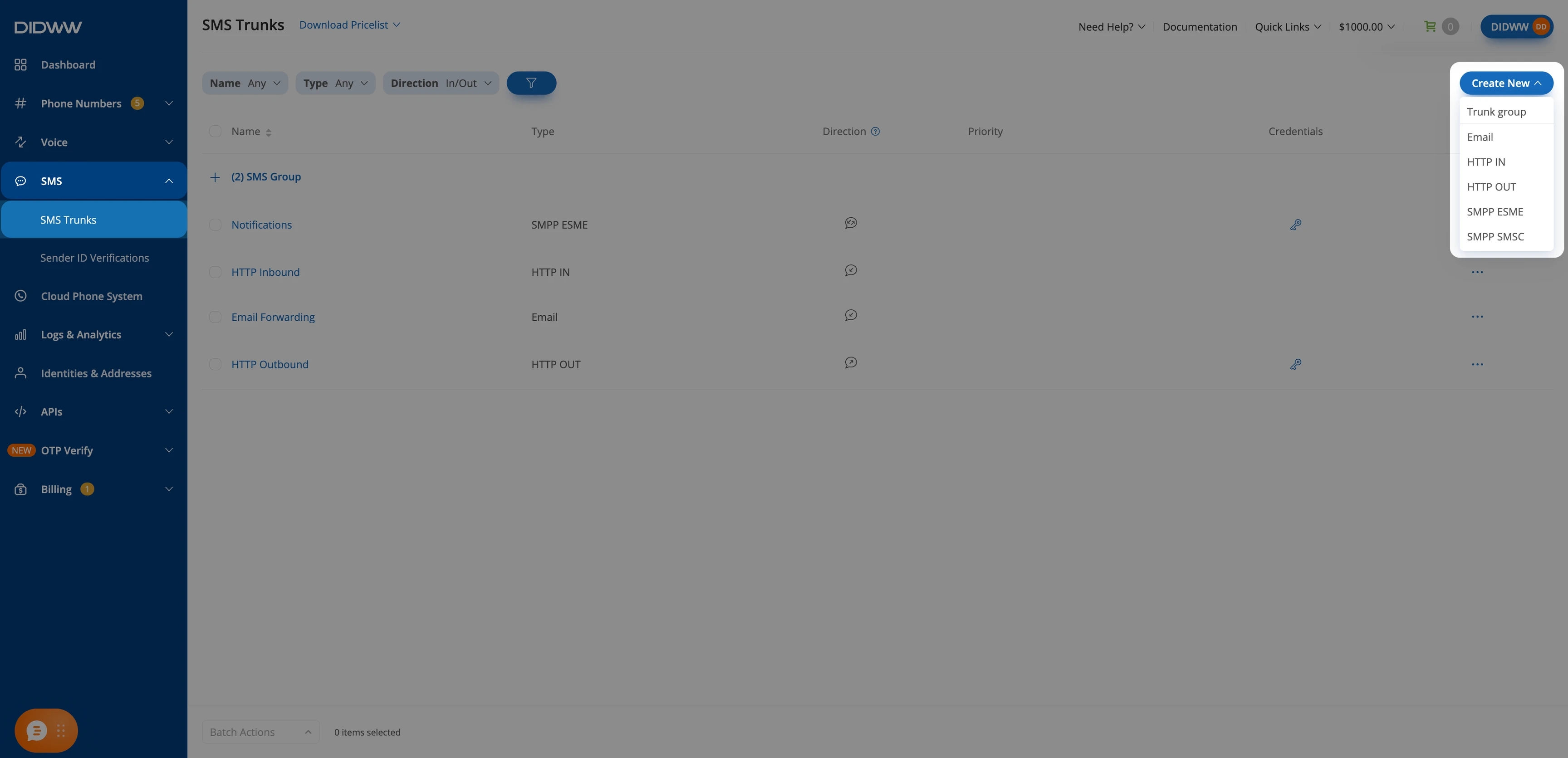
Creating a new SMPP ESME trunk.#
Step 2: Configure general trunk settings#
In the Create SMPP ESME Trunk form:
Enter a Friendly name for the trunk (e.g.,
OpenSIPS).Enter a System type (e.g.,
OpenSIPS). Thedb_texttable requires a non-empty value. See Define the SMSC.Select the Server location: US, NY or NL, AMS. It determines the host OpenSIPS connects to.
Optionally, enter the public IP address of the OpenSIPS server in Allowed IP addresses. If the field is empty, any address can connect with the trunk credentials.
Under Source Address Settings, keep Allow any DID(s) for SMS OUT enabled, or turn it off and select the DIDs allowed as senders.
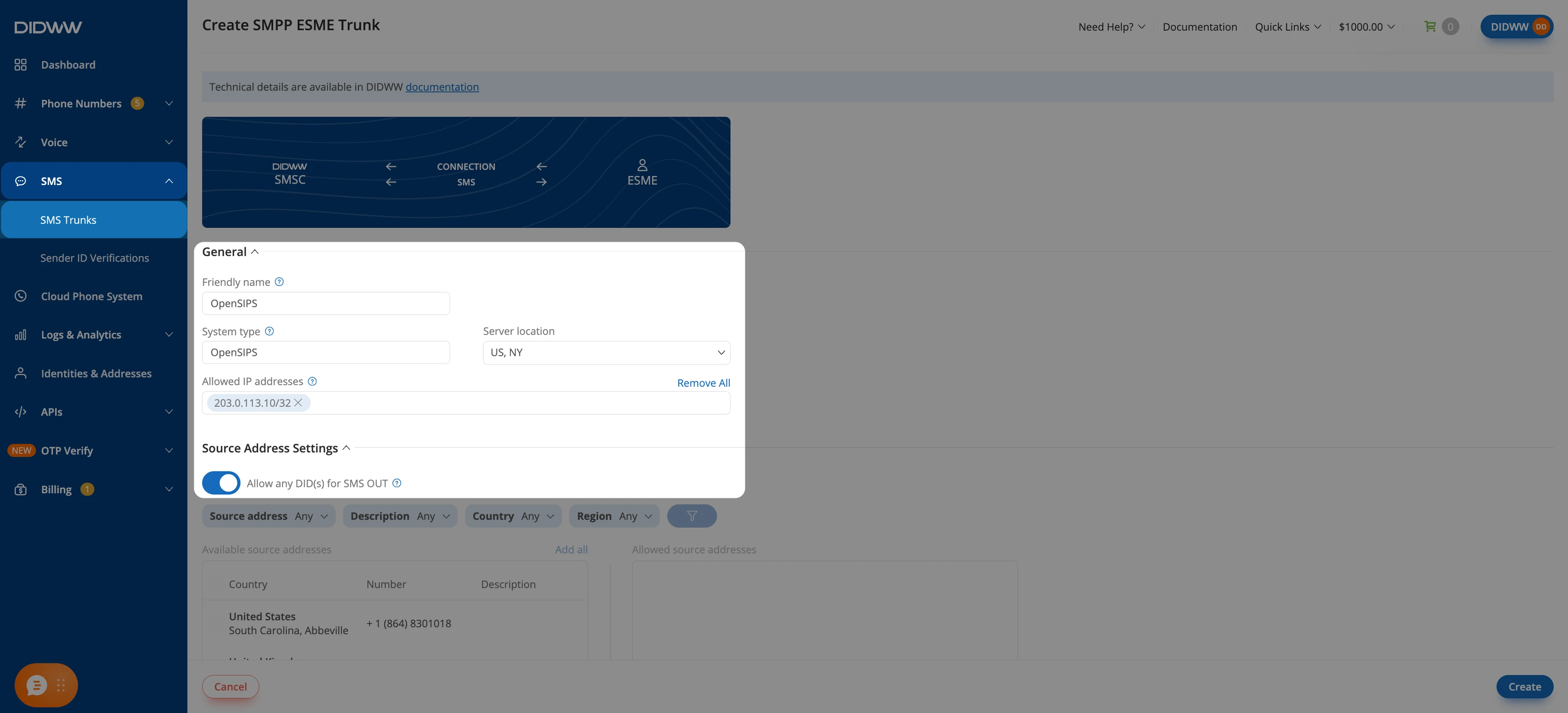
SMPP ESME trunk settings.#
Step 3: Click Create and save the SMPP ESME trunk#
When all required fields in the Create SMPP ESME Trunk form are filled, click Create to save the trunk. The trunk appears in the SMS Trunks list.
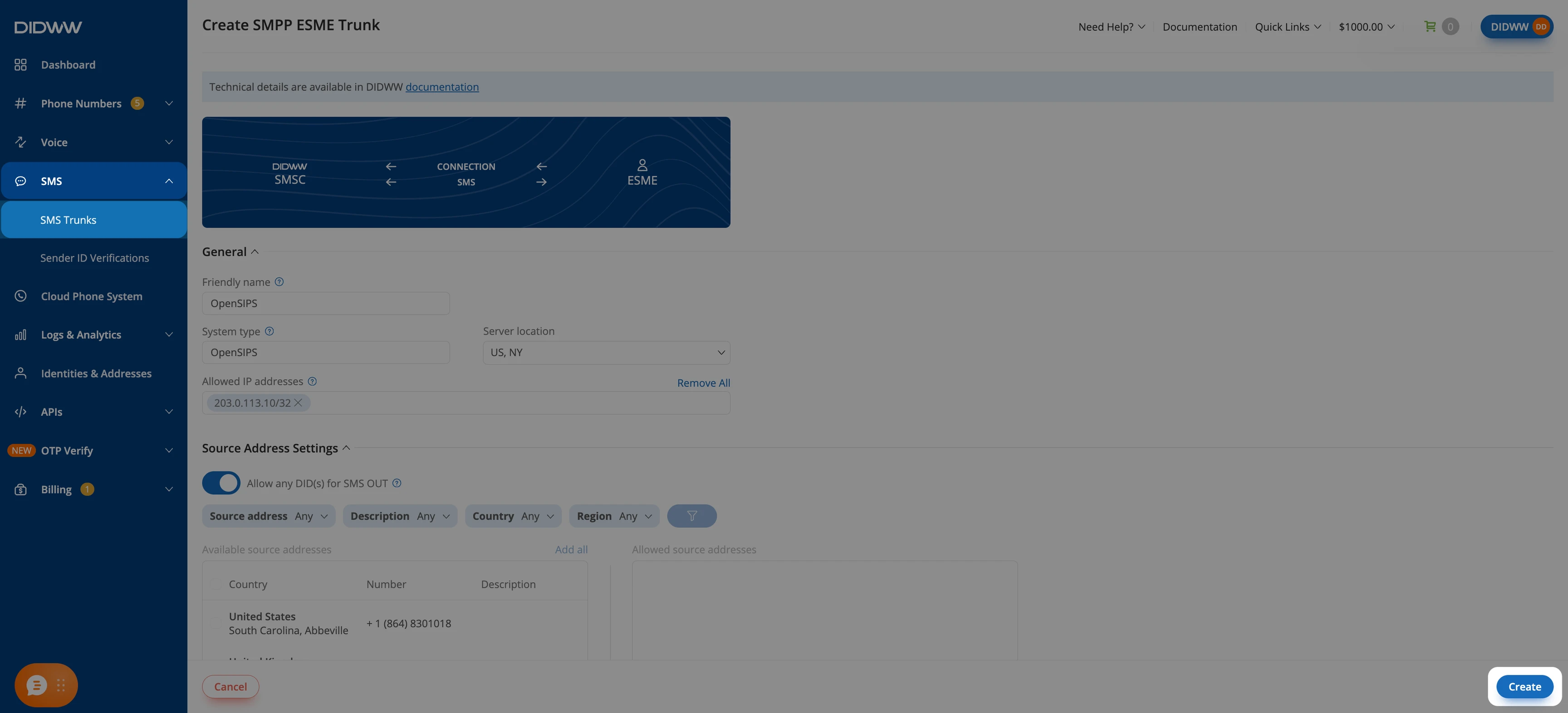
Saving the SMPP ESME trunk.#
Step 4: Copy the trunk credentials#
In the SMS Trunks list, click the key icon in the Credentials column of the trunk.
Copy the System ID, the Password (click the eye icon to show it), and the Host. You will use them to define the SMSC.
Note
OpenSIPS truncates a password longer than 9 characters and a System ID longer than 16 characters, and logs this once at startup. Check the length of the credentials before you configure them.
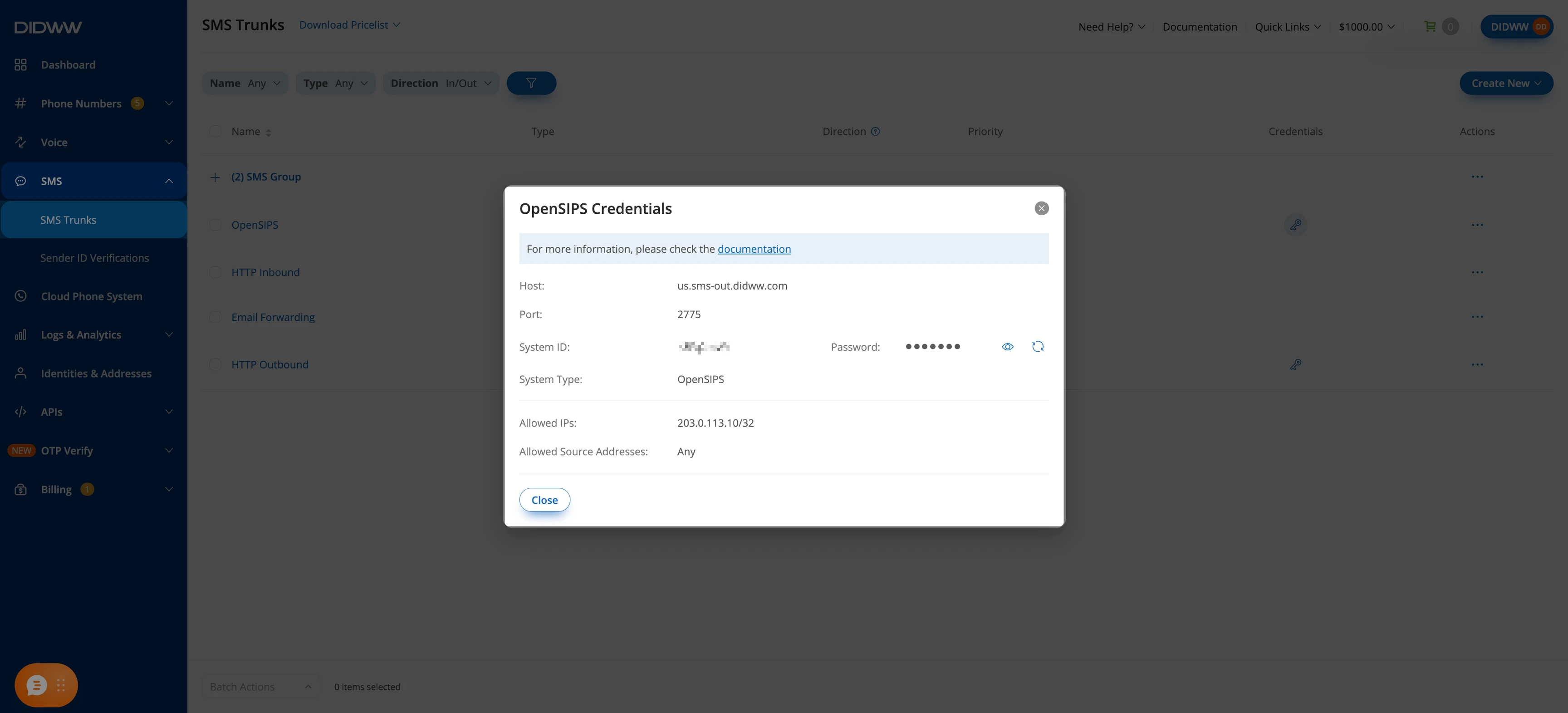
SMPP ESME trunk credentials.#
Step 5: Assign the trunk to your DID numbers#
This step is required only to receive SMS.
In the DIDWW User Panel, go to Phone Numbers > My Numbers.
In the Trunk column of the DID, click the SMS: entry and select the trunk created in Step 3.
Click Confirm.
To assign the trunk to several DIDs at once, see Assign an SMS trunk.
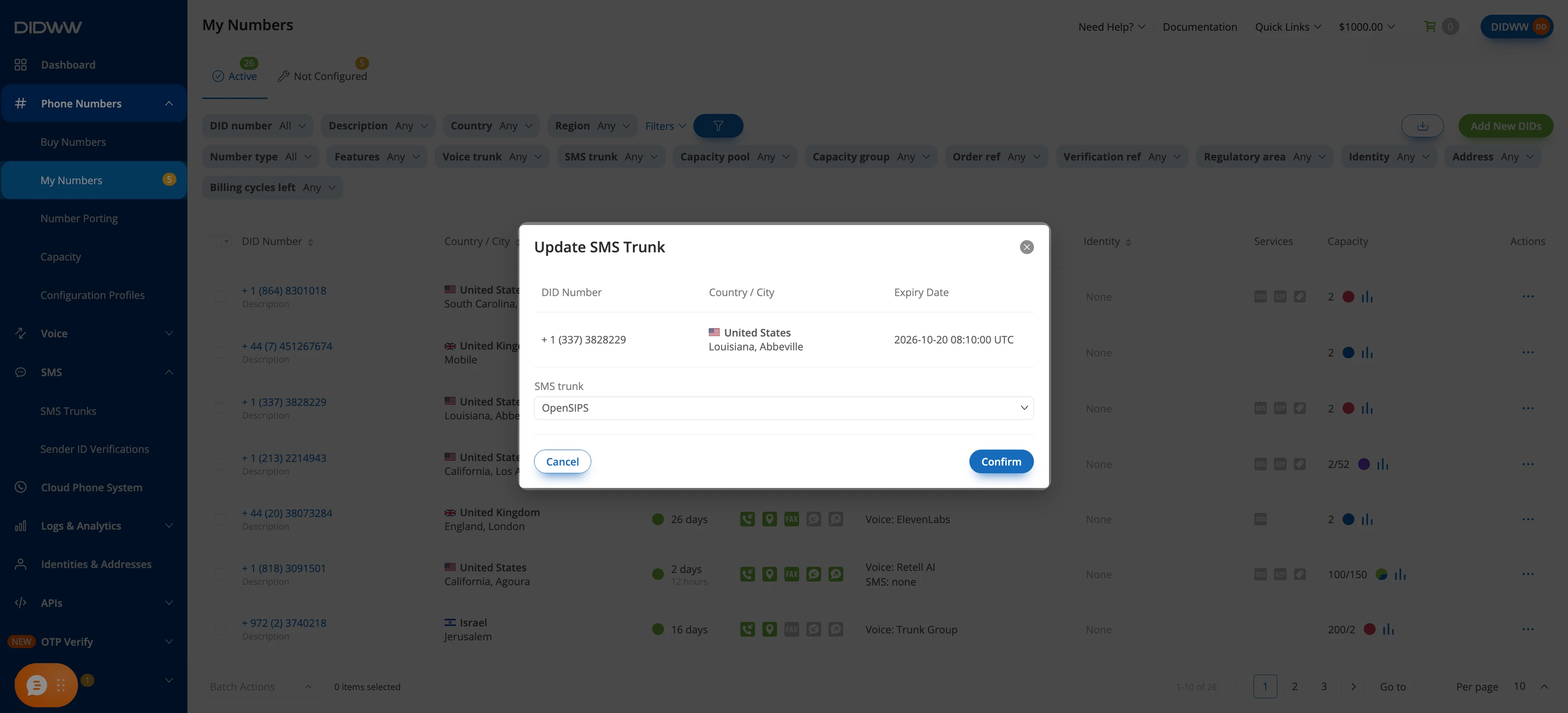
Assigning the SMS trunk to a DID.#
2. Configure OpenSIPS#
Configure OpenSIPS to bind to the DIDWW SMSC and relay messages between
DIDWW and one user agent. The examples use /etc/opensips/opensips.cfg for
the script and /etc/opensips/dbtext/ for the db_text tables. Replace
the uppercase placeholders with the values for your deployment.
Before you begin#
OpenSIPS 4.0 is required. The
proto_smppanddb_textmodules used in this part are included in theopensipspackage.Have the System ID, Password, Host, and System type from Part 1 at hand.
Step 1: Configure the OpenSIPS script#
The following blocks build /etc/opensips/opensips.cfg in order. Back up
the current file, then replace its contents with the blocks below.
1.1 Configure the sockets and the connect timeout#
Begin the file with the global parameters:
log_level=3
stderror_enabled=yes
syslog_enabled=no
udp_workers=2
tcp_workers=2
tcp_connect_timeout=2000

socket=udp:0.0.0.0:5060
socket=smpp:OPENSIPS_IP:2775
The UDP socket receives MESSAGE requests from the user agent. The
smpp socket is required. proto_smpp does not start without one,
because the connection to the SMSC is opened from it. Set
OPENSIPS_IP to an IP address of the OpenSIPS server, not the DIDWW host.
The DIDWW host is set when you define the SMSC.
Important
tcp_connect_timeout defaults to 100 ms, which can be shorter than the
round-trip time to the DIDWW SMSC. The connection then fails with
connect timed out in the log, and OpenSIPS keeps retrying.
1.2 Load the required modules#
Add the module block below the global parameters:
mpath="/usr/lib/x86_64-linux-gnu/opensips/modules/"

loadmodule "proto_udp.so"
loadmodule "signaling.so"
loadmodule "sl.so"
loadmodule "tm.so"
loadmodule "maxfwd.so"
loadmodule "sipmsgops.so"

loadmodule "db_text.so"
modparam("db_text", "db_mode", 0)

loadmodule "proto_smpp.so"
modparam("proto_smpp", "db_url", "text:///etc/opensips/dbtext")
modparam("proto_smpp", "outbound_uri", "sip:USER_AGENT_IP:5060")
mpath is the module directory of an x86-64 build. Other architectures use
their own directory name.
db_url points to the directory with the db_text tables from
Define the SMSC. outbound_uri is
the address of the user agent. OpenSIPS sends every incoming SMS and delivery
receipt there as a SIP MESSAGE, without running the routing script.
proto_smpp requires tm.
1.3 Define the SMSC#
proto_smpp reads the SMSC from a table named smpp. With
db_text, the table is a file in the db_url directory, next to a
version file. Create both.
/etc/opensips/dbtext/version:
table_name(str) table_version(int)
smpp:1
/etc/opensips/dbtext/smpp:
id(int,auto) name(string) ip(string) port(int) system_id(string) password(string) system_type(string) src_ton(int) src_npi(int) dst_ton(int) dst_npi(int) session_type(int)
1:DIDWW:SMSC_IP:2775:SYSTEM_ID:PASSWORD:SYSTEM_TYPE:1:1:1:1:1
Column |
Value |
|---|---|
|
|
|
The IP address of the Host from Step 4. A hostname is not accepted. Resolve
it first, for example with |
|
|
|
The System ID and Password from Step 4. |
|
The System type from Step 2. |
|
|
|
|
Every field must be non-empty. db_text reads an empty field as NULL and
rejects the table. A : inside a value must be escaped as \:.
Note
The table is read at startup. Restart OpenSIPS after changing it.
1.4 Configure outbound messages#
Add the routing logic below the module block:
route {

    if (!mf_process_maxfwd_header(10)) {
        send_reply(483, "Too Many Hops");
        exit;
    }

    if (is_method("OPTIONS")) {
        send_reply(200, "OK");
        exit;
    }

    if (!is_method("MESSAGE")) {
        send_reply(405, "Method Not Allowed");
        exit;
    }

    if ($si != "USER_AGENT_IP") {
        send_reply(403, "Forbidden");
        exit;
    }

    xlog("L_INFO", "SMS out: from=$fU to=$rU callid=$ci\n");

    $var(utf16) = 0;
    if ($hdr(X-SMS-Encoding) =~ "UTF-16")
        $var(utf16) = 1;

    if (send_smpp_message("DIDWW", $fU, $rU, $rb, $var(utf16), 1)) {
        send_reply(202, "Accepted");
    } else {
        xlog("L_ERR", "send_smpp_message failed rc=$rc callid=$ci\n");
        send_reply(500, "SMPP send failed");
    }
    exit;
}
The route accepts MESSAGE requests from the user agent only.
send_smpp_message() sends each one to the SMSC named DIDWW in
Define the SMSC:
The sender is the user part of the
From($fU). It must be a DID with Outbound P2P SMS or a verified sender ID. Enter a DID in international format without+.The recipient is the user part of the Request-URI (
$rU), in the same format.The text is the message body (
$rb).The last argument,
1, requests a delivery receipt.
A positive return value means the message was sent to the SMSC, not
that it was accepted. The SMSC’s answer appears only in the log:
Successfully sent message "<id>", or Error in submit_sm_resp <code>
with an SMPP status code.
Note
OpenSIPS does not convert text between encodings. To send non-Latin text,
the user agent sends the body as UTF-16BE written in hexadecimal digits and
adds the header X-SMS-Encoding: UTF-16. The script then passes 1 as
the UTF-16 argument. See Send a message.
1.5 Configure inbound messages#
Inbound SMS and delivery receipts need no routing logic. For each one,
proto_smpp builds a SIP MESSAGE and sends it to the outbound_uri
from the module settings, without running
the script:
The user part of the Request-URI is the receiving DID.
The user part of the
Fromis the sender’s number.The body is the text in UTF-8, with
Content-Type: text/plain. A UCS-2 message arrives as UTF-16 in hexadecimal digits, withContent-Type: text/plain; charset=UTF-16.
A delivery receipt arrives the same way, with the receipt as the body:
id:00000000-0000-0000-0000-000000000000 sub:001 dlvrd:001 submit date:2609161429 done date:2609161429 stat:DELIVRD err:0 text:-
Important
stat:DELIVRD is the SMSC’s report. The destination network can
still drop the message without notice, for example when its content filter
treats the text as spam.
Step 2: Load the configuration#
Check that the configuration parses:
opensips -C -f /etc/opensips/opensips.cfg
Important
config file ok, exiting... confirms only that the script parses. The
check does not read the smpp table or connect to the SMSC. Start
OpenSIPS and review the startup output as well.
Start OpenSIPS in the foreground:
opensips -F -f /etc/opensips/opensips.cfg
Leave OpenSIPS running. To encrypt the SMPP connection, continue with Step 3. Otherwise, go to Step 4.
Step 3: Carry the SMPP connection over TLS (optional)#
proto_smpp has no TLS support. To encrypt the connection, run a TLS client
such as stunnel on the OpenSIPS server. OpenSIPS
connects to stunnel on the loopback interface, and stunnel connects to the
DIDWW SMSC on port 2776.
Create
/etc/stunnel/smpp-didww.conf:[smpp-didww] client = yes accept = 127.0.0.1:2775 connect = SMSC_IP:2776 verifyChain = yes CAfile = /etc/ssl/certs/ca-certificates.crt checkHost = sms-out.didww.com sni = sms-out.didww.com
SMSC_IPis the address from Define the SMSC.CAfileis the system CA bundle on Debian.Start stunnel.
In the
smpptable, replaceSMSC_IPwith127.0.0.1, then restart OpenSIPS.
Important
Keep checkHost set to sms-out.didww.com for every Host. The
certificate on port 2776 is issued for this name only, so verification
against us.sms-out.didww.com or eu.sms-out.didww.com fails.
Step 4: Verify the configuration#
Check |
Action |
Expected result |
|---|---|---|
SMPP socket |
Review the startup output. |
A |
SMSC table |
Review the startup output. |
|
Bind |
Review the startup output. |
|
Bind status in DIDWW |
In SMS > SMS Trunks, open the trunk’s actions menu and select Check Status. |
Connected |
Outbound SMS |
Send a |
The |
Inbound SMS |
Send an SMS to a DID assigned in Step 5. |
The user agent receives a |
With TLS, the stunnel log also shows Certificate accepted at depth=0:
CN=sms-out.didww.com.
Common issues#
connect timed out repeats in the log and the bind never succeeds
tcp_connect_timeout is too low. See the sockets and the connect
timeout.
OpenSIPS exits with at least one listener is mandatory for using the SMPP module
The smpp socket is missing. See the sockets and the connect
timeout.
OpenSIPS exits with missing modparam: ‘smpp_outbound_uri’
outbound_uri is not set. The error uses a different name for the same
parameter. See the module settings.
OpenSIPS exits with no transport protocol loaded
loadmodule "proto_udp.so" is missing. See the module settings.
error while querying database at startup, and every message fails with rc=-2
No SMSC was loaded, for example because a field in the smpp
table is empty. See Define the SMSC.
The bind fails with Error in bind_transceiver_resp 0000000d
The SMSC rejected the bind. Check the System ID and Password. See Step 4.
With stunnel, Connection refused on 127.0.0.1:2775, then a successful bind
OpenSIPS started before stunnel. The module retries the connection. Start stunnel first to avoid the error.
The SMSC answers Error in submit_sm_resp 00000001
The message body was empty. Check what the user agent sends.
Non-Latin text arrives as a string of hexadecimal digits
The body was UTF-16 in hexadecimal digits, but the X-SMS-Encoding:
UTF-16 header did not reach OpenSIPS, so the digits were sent as text.
See outbound messages.
3. Send and receive messages (Asterisk example)#
OpenSIPS does not create messages, so a SIP user agent has to send and receive
them. It sends each outbound SMS to OpenSIPS as a MESSAGE request, and
receives inbound SMS and delivery receipts from OpenSIPS the same way. This
part uses Asterisk 22 with PJSIP as an example. Any user agent that sends and
receives SIP MESSAGE requests can be used instead.
Important
Run Asterisk on a different host from OpenSIPS. Both listen on UDP port
5060.
Step 1: Configure the endpoint#
In /etc/asterisk/pjsip.conf, define OpenSIPS as an endpoint:
[transport-udp]
type=transport
protocol=udp
bind=0.0.0.0:5060

[opensips]
type=endpoint
context=sms-in
message_context=sms-in
disallow=all
allow=ulaw
aors=opensips

[opensips]
type=aor
contact=sip:OPENSIPS_IP:5060
qualify_frequency=0

[opensips]
type=identify
endpoint=opensips
match=OPENSIPS_IP
The identify section matches requests from OpenSIPS to this endpoint.
message_context sends incoming MESSAGE requests to the sms-in
context. See Step 2.
Step 2: Configure the dialplan#
Add two contexts to /etc/asterisk/extensions.conf:
[sms-in]
exten => _X.,1,NoOp(SMS in: from=${MESSAGE(from)} to=${MESSAGE(to)})
 same => n,Verbose(1,SMS in body: ${MESSAGE(body)})
 same => n,Hangup()

[sms-out]
exten => _X.,1,Set(MESSAGE(body)=${SMS_BODY})
 same => n,ExecIf($["${SMS_ENCODING}" != ""]?Set(MESSAGE_DATA(X-SMS-Encoding)=${SMS_ENCODING}))
 same => n,MessageSend(pjsip:opensips/sip:${EXTEN}@OPENSIPS_IP:5060,sip:${SMS_SOURCE}@USER_AGENT_IP)
 same => n,NoOp(MessageSend status: ${MESSAGE_SEND_STATUS})
 same => n,Hangup()
sms-in receives inbound SMS and delivery receipts. The extension is the
receiving DID, the sender is in MESSAGE(from), and the text is in
MESSAGE(body).
sms-out sends one SMS. The recipient is the extension, the sender is
SMS_SOURCE (the DID, in international format without +), and the
text is SMS_BODY.
Note
Asterisk sends a MESSAGE with Content-Type: text/plain and replaces
a value set with MESSAGE_DATA(Content-Type). This is why the UTF-16
marker is the custom X-SMS-Encoding header, which Asterisk passes
unchanged.
Step 3: Send a message#
Create a call file that runs sms-out, then move it into the outgoing spool
directory:
cat > /var/spool/asterisk/tmp/sms.call <<'EOF'
Channel: Local/RECIPIENT@sms-out
Application: Wait
Data: 1
MaxRetries: 0
Set: SMS_SOURCE=SENDER_DID
Set: SMS_BODY=Hi, I will be in the office tomorrow morning
EOF
mv /var/spool/asterisk/tmp/sms.call /var/spool/asterisk/outgoing/
RECIPIENT and SENDER_DID are numbers in international format without
+. Create the file outside the outgoing directory, on the same
filesystem, so that Asterisk does not read a partial file.
For non-Latin text, convert the body to UTF-16BE in hexadecimal digits and
set SMS_ENCODING:
printf %s "你好" | iconv -f UTF-8 -t UTF-16BE | od -An -v -tx1 | tr -d ' \n'
Set: SMS_BODY=4f60597d
Set: SMS_ENCODING=UTF-16
For more information about the SMPP module, see the official proto_smpp documentation.